

July 04, 2026
The $18,000/year problem: why small businesses are being priced out of SEO
SEO agencies charge $1,500 to $5,000 per month. For a small business making $200K, that is up to 30% of gross revenue on one channel. The economics are broken.
61% of small businesses skip SEO entirely. Build a complete content strategy for under $99/mo using free tools and AI — no agency required.

Sixty-one percent of small businesses aren't investing in SEO at all [1]. Not because they don't want to but because agencies charge $2,000–$5,000 per month, and 33% of SMBs have total marketing budgets under $1,000.
Organic search still drives 53.3% of all trackable website traffic (BrightEdge). Ignoring it isn't a budget decision. It's a growth ceiling.
This guide walks you through building a complete SEO content strategy from scratch — using free tools, low-cost software, and AI. No agency retainer. No six-month wait for a "strategy deck." You'll have a working plan by the end of today.
Why this guide exists: We built PageRise after watching small businesses cobble together four or five separate tools just to do what one good SEO consultant does. The process below mirrors what the platform automates — but you can follow it manually with zero budget.
Key Takeaways
By the end of this step, you'll know exactly where your site stands in search — which pages rank, which don't, and where the biggest opportunities are hiding.
Most agencies spend weeks on this. You can do it in 30 minutes with Google Search Console.
Open GSC and look at three things:
Our finding: Sites that focus on queries where they rank positions 8–20 (the "striking distance" keywords) typically see 30–50% traffic gains within 90 days — without publishing a single new page.
Mark those striking-distance keywords in your spreadsheet with their current position, impressions, and click-through rate.
Don't skip the technical side either. Use Google's free PageSpeed Insights tool to catch the worst performance issues. If your site takes more than three seconds to load, fix that before worrying about content strategy.
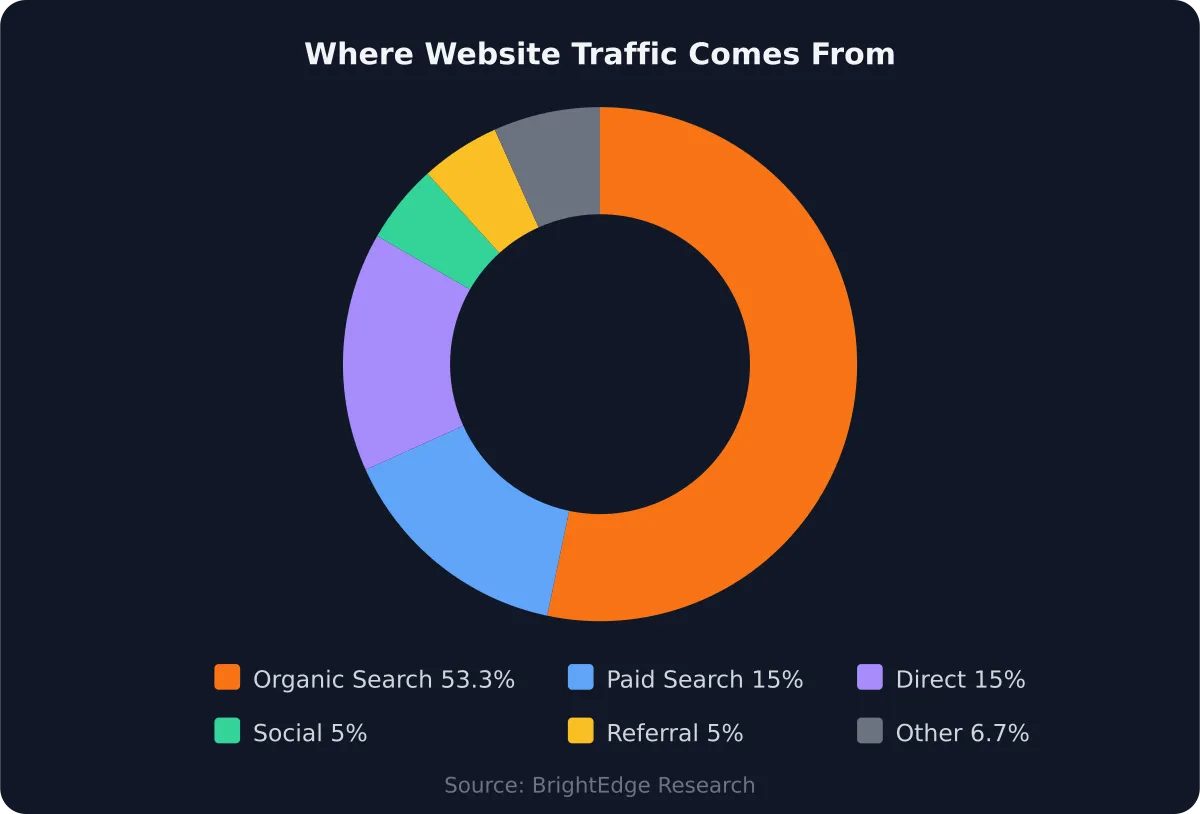
With over half of all website traffic coming from organic search, skipping SEO isn't saving money. It's leaving it on the table.
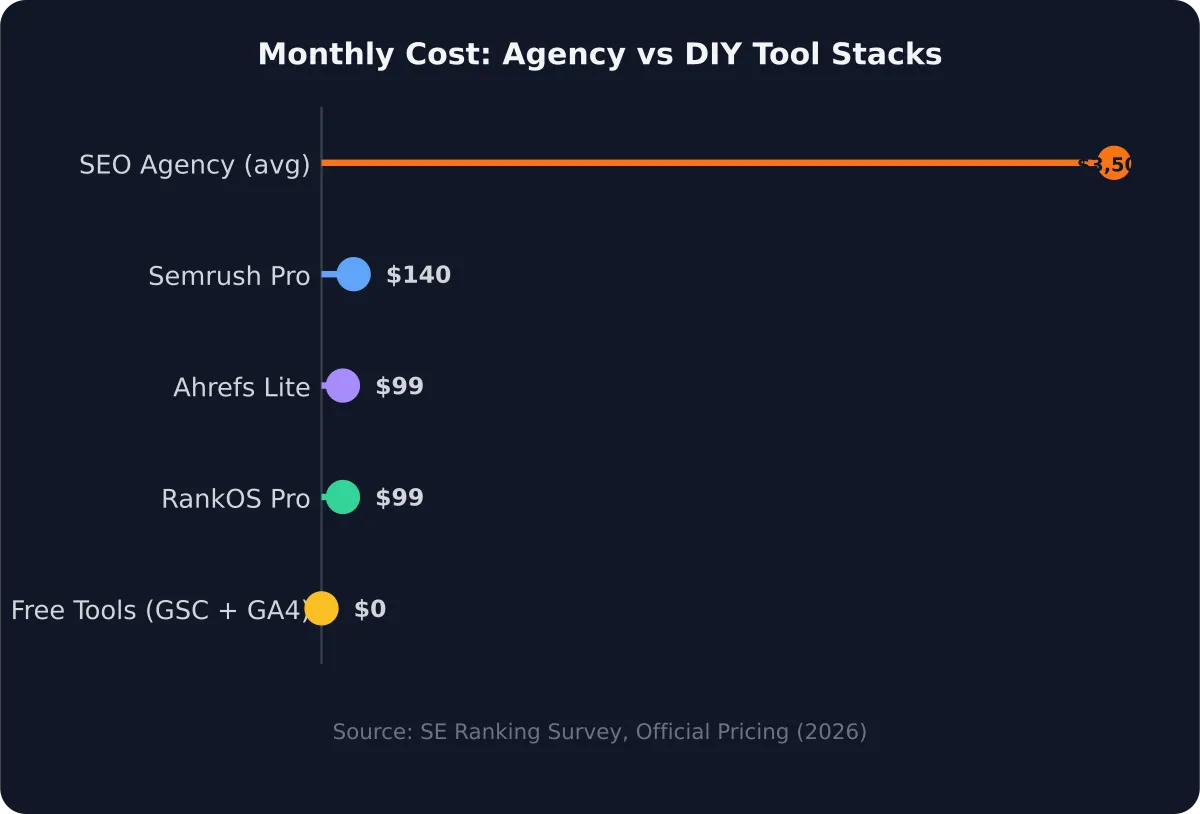
You don't need a $140/month Semrush subscription to find good keywords. Google Search Console gives you the raw data — you just need to know how to read it.
Fifty-six percent of marketers now use AI tools for SEO keyword research [3]. But before you add any tool, mine what you already have.
These are keywords Google already associates with your site.
Export that list and group them by topic. If you're a bakery, you might see clusters around:
Each cluster becomes a content topic.
For new keyword ideas beyond GSC, use these free methods:
To prioritise without paid difficulty scores, focus on long-tail keywords (3+ words) with clear buying intent. For example:
The longer, more specific phrase usually has less competition and higher conversion intent.
SEO content strategy isn't about publishing more. It's about publishing the right type of content for each keyword's intent. Get this wrong and even perfectly written articles won't rank.
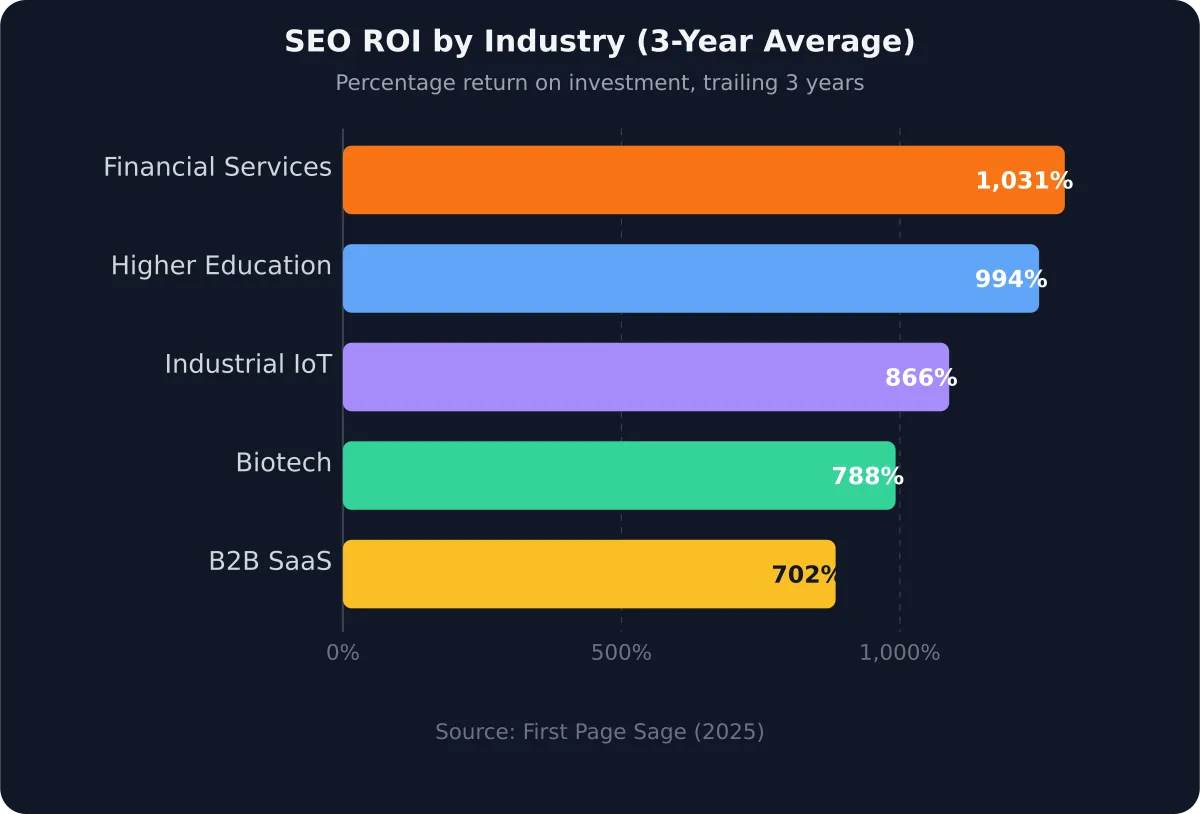
B2B SaaS companies see an average 702% ROI from SEO over three years, with a seven-month break-even point [4]. That return compounds because each piece of strategic content builds on the last. Random publishing doesn't compound. Intentional, mapped content does.
Every keyword falls into one of four intent categories:
Take your keyword clusters from Step 2 and tag each one with an intent type.
Most small businesses should roughly allocate:
According to First Page Sage's 2025 analysis of over 100 million data points, SEO delivers 702–1,031% ROI across industries over three years [4]. That makes organic content the single highest-returning marketing channel for businesses willing to invest the time — even without an agency.
A strategy without a schedule is just a wish list. You need a realistic content calendar that fits your actual capacity — not an agency's.
Organic search generates 44.6% of all B2B revenue, making it the single largest revenue channel for B2B companies (BrightEdge). But that revenue comes from consistency, not volume.
Publishing one well-researched article per week beats four thin posts per month every time.
That's two new articles and two updates per month — manageable for a founder spending 3–5 hours per week on content.
Use a simple spreadsheet with these columns:
Google Sheets, Notion's free tier, or even Google Calendar are enough.
Match your publishing pace to your resources. If one article per week is too much, do two per month. Consistency matters more than frequency. What kills DIY SEO isn't lack of budget — it's starting strong and stopping after six weeks.
This is where most DIY SEO strategies fall apart. You've got keywords and a calendar, but sitting down to write a 2,000-word article feels impossible. AI changes that equation.
Seventy percent of businesses report higher ROI after integrating AI into their SEO workflows [5]. The AI SEO tools market hit $1.2 billion in 2024 and is projected to reach $4.5 billion by 2033 [3]. This isn't a trend — it's the new baseline.
Do this:
Don't do this:
The real advantage isn't speed — it's consistency. Most small business owners abandon their content strategy because writing takes too long. AI reduces a 6-hour article to a 2-hour review-and-edit process. That's the difference between publishing every week and publishing twice then quitting.
Platforms like PageRise take this further with agentic workflows — the AI doesn't just write, it:
You review and approve at every step, with progressive autonomy controls that let you set exactly how much the AI does independently.
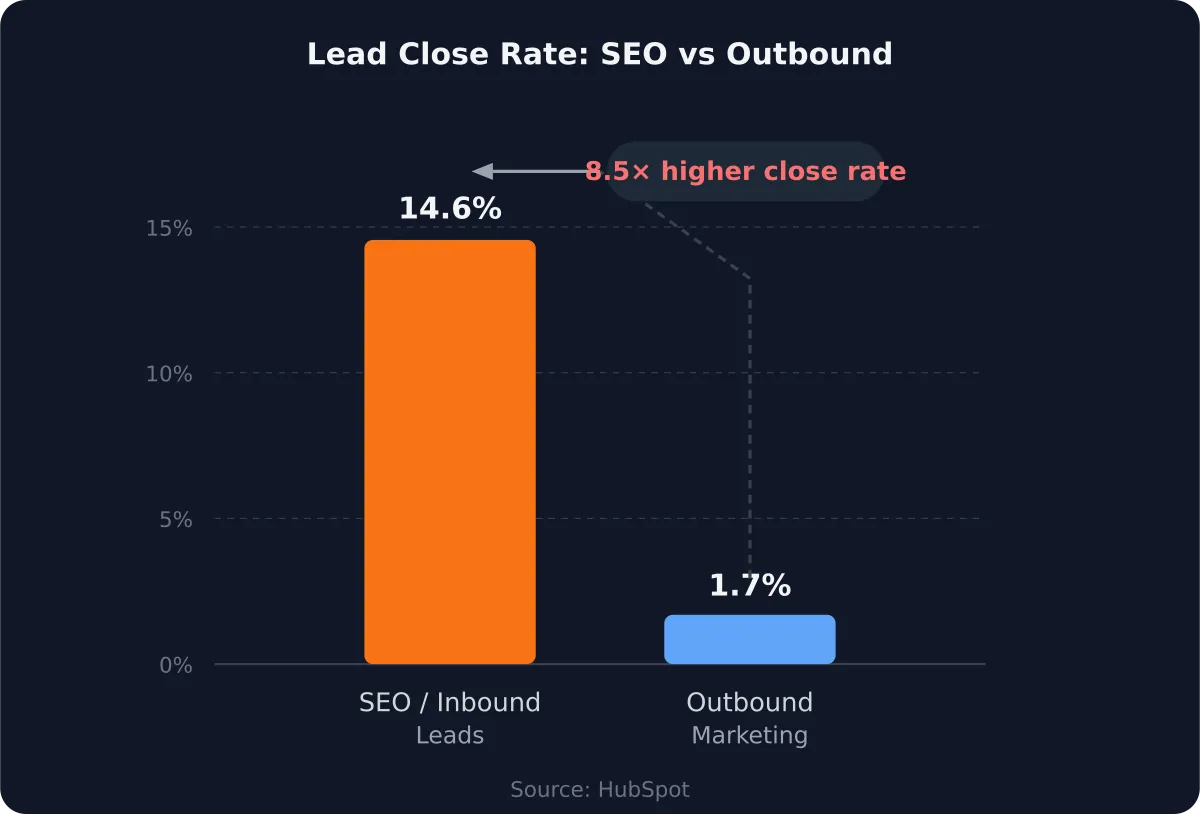
According to HubSpot research, SEO leads close at 14.6% compared to just 1.7% for outbound marketing — an 8.5x advantage (HubSpot). Every article you publish and optimise is a compounding asset that keeps generating leads long after you've written it. Paid ads stop the moment you stop paying.
You've published content. Now what? Without tracking, you're flying blind. But you don't need an agency's monthly report to know whether it's working.
Organic search has an average conversion rate of 2.7%, competitive with paid search's 3.2% and well above social media's 1.5% [6]. The difference? Organic traffic doesn't cost per click, and performance improves as content ages and gains authority.
In Google Search Console and GA4, monitor:
Set realistic expectations. SEO isn't instant. First Page Sage data shows a seven-month average break-even for SEO investment. Most articles take 3–6 months to reach their ranking potential. If you're not seeing movement after 90 days on a specific piece, revisit the keyword targeting and content quality.
The iteration loop is simple: every month, look at your top-performing content and ask what made it work. Then look at your underperforming pieces and ask what's missing. Update, expand, or consolidate. This is exactly what agencies do — they just charge $3,500/month for it.
PageRise Mission Control dashboard tracks all these metrics automatically with AI daily analysis → Mission Control
The most common reason DIY SEO fails isn't lack of knowledge — it's inconsistency. Forty-three percent of small businesses have zero full-time marketing employees [1]. SEO becomes nobody's job, which means it becomes nobody's priority.
1. Targeting keywords that are too competitive
New sites can't rank for "best CRM software" against HubSpot and Salesforce. Start with long-tail keywords where you have a realistic chance. Check who ranks on page one — if it's all Fortune 500 companies, pick a different keyword.
2. Publishing without a content map
Random articles don't build topical authority. Search engines reward clusters of related content. One pillar page linking to five supporting articles outperforms six unrelated posts every time.
3. Ignoring existing content
Don't only publish new articles. Updating a page that already ranks position 15 is faster and easier than writing something from scratch. Refresh statistics, add new sections, improve the title — then resubmit to Google via GSC.
4. Giving up before the compound effect kicks in
SEO breaks even at seven months on average. Most people quit at three. The businesses that succeed are the ones that treat content like a fixed expense, not a project with a deadline.
Built for exactly this workflow, PageRise consolidates SEO data, competitor intelligence, and AI-powered content strategy into one platform with agentic workflows. The audit, keyword research, competitor analysis, strategy, content drafting, and tracking from this guide — automated with nine AI pipelines. You control the autonomy level at every step through progressive autonomy controls.
You don't need a $3,500/month agency to compete in organic search. You need a process, the right free tools, and consistent execution. This guide gives you the process. Google gives you the tools. The execution is up to you.
Start with Step 1 today — connect Google Search Console if you haven't already, and spend 30 minutes identifying your striking-distance keywords. That single action puts you ahead of 61% of small businesses that aren't investing in SEO at all.
And if you want to compress weeks of manual work into hours, PageRise was built for exactly this. Get early access and let the AI handle the heavy lifting while you stay in control.
Published on by Mike , Founder in seo content strategy diy seo small business seo seo without agency content marketing ai seo tools
Share this article:

Mike · Founder
Mike is building PageRise after years of working inside the real-world chaos of websites, ads, CRMs, automations, and lead generation. His focus is simple: help brands and small businesses get clearer strategy, better content decisions, and more useful growth intelligence without drowning in dashboards, jargon, or bloated agency retainers.